Your to-do list is broken. Here’s why.
Dec 01, 2025
Most corporate leaders I talk to are stuck.
They think they are innovating. They buy subscriptions to ChatGPT. They encourage their teams to “use AI.”
But when I look at their daily operations, nothing has changed.
They are still manually typing tasks into a list. They are still manually checking off boxes. They are still the bottleneck in their own workflow.
This is what I call Level 1 Automation Hell.
You have the tools, but you lack the system. You are using a supercomputer to do the job of a sticky note.
Today, we are going to fix that.
We are moving from Level 1 (doing it yourself) to Level 2 and 3 (building agents that do it for you).
I am going to walk you through exactly how I built a Google Tasks Agent inside our Ultimate AI Agent framework. This isn’t just about a grocery list. It is about architectural control.
If you can teach an AI to manage your personal tasks, you can teach it to manage your enterprise CRM.
Here is how we build it.
A standard chatbot is a talker. It gives you text.
An AI Agent is a doer. It has tools.
In this workflow, we are using n8n. It is the backbone of our operation. We are connecting a fast LLM (like Groq) to Google’s API.
But we don’t just plug them together. We have to design the “brain.”
In our Ultimate AI Agent setup, we have to explicitly tell the AI what it is capable of. If you don’t define the tool, the AI is blind. It doesn’t know it has hands.
So, I added a specific description to the system prompt:
- Tool Name: Task Agent
- Description: Use Google Tasks to create, update, delete, and get tasks.
This sentence is critical. It tells the router, “Hey, if the human mentions anything about a to-do list, send the job to the Task Agent.”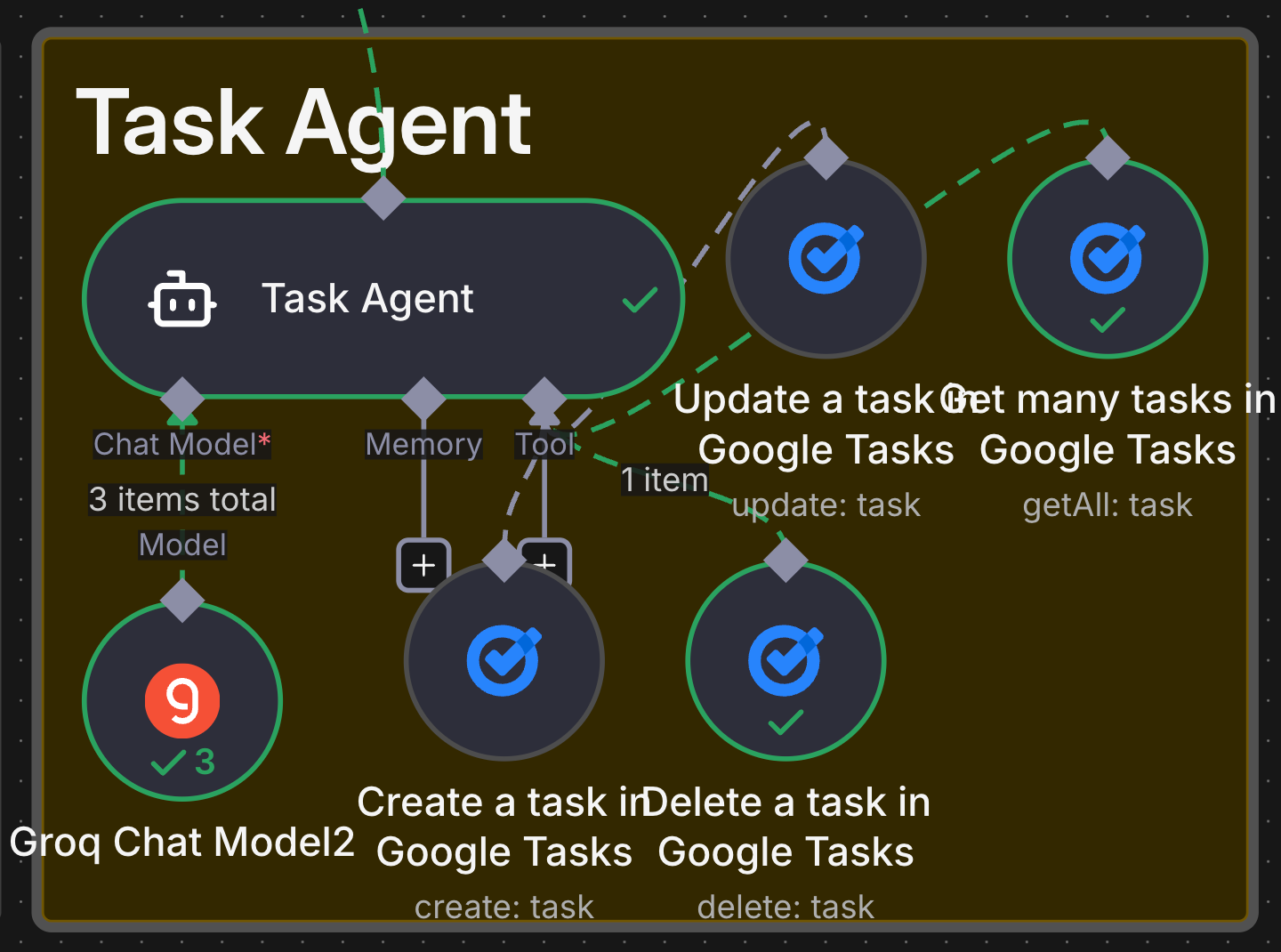
The first test of any agent is context. Can it see what is already there?
Most people skip this. They just want to generate text. But in a corporate environment, you need to know the state of play before you act.
I built a specific tool called get_many_tasks.
It doesn’t just grab one; it grabs the whole list.
In my test, I asked the agent a simple question:
“Do I have any tasks for today?”
Here is what happened behind the scenes:
- The <strong>Ultimate AI Agent</strong> received the text.
- It analyzed the intent. It realized this wasn’t a question about the weather. It was about tasks.
- It routed the request to the Google Tasks tool.
- It triggered the <em>get_many_tasks</em> function.
The result?
My Telegram bot immediately fired back with my real-time list:
- <strong>Task 1:</strong> Convert images with Nano Banana
- <strong>Task 2:</strong> Update video research
- <strong>Task 3:</strong> A/B Testing
It matched my Google Tasks perfectly.
This seems simple. It isn’t.
This is the foundation of data integrity. The AI is now reading from your live database, not hallucinating an answer.
Reading data is safe. Writing data is where the power lies.
If you want to move up the 5 Levels of Automation, you need to trust the AI to touch your systems.
I decided to test it with a new command.
“Add a new task: Call Spider-Man today.”
I intentionally used casual language. I didn’t write a code snippet. I spoke like a human.
The agent parsed the request. It identified the action (create_task). It identified the payload ("Call Spider-Man").
We are using the Groq chat model here. Why? Because it is fast.
Speed matters.
If you are building a corporate dashboard, you cannot wait 10 seconds for a task to appear. It needs to be instant.
Within a second, the task appeared on my Google list:
Call Spider-Man.
The system works. It took natural language and converted it into a structured API call.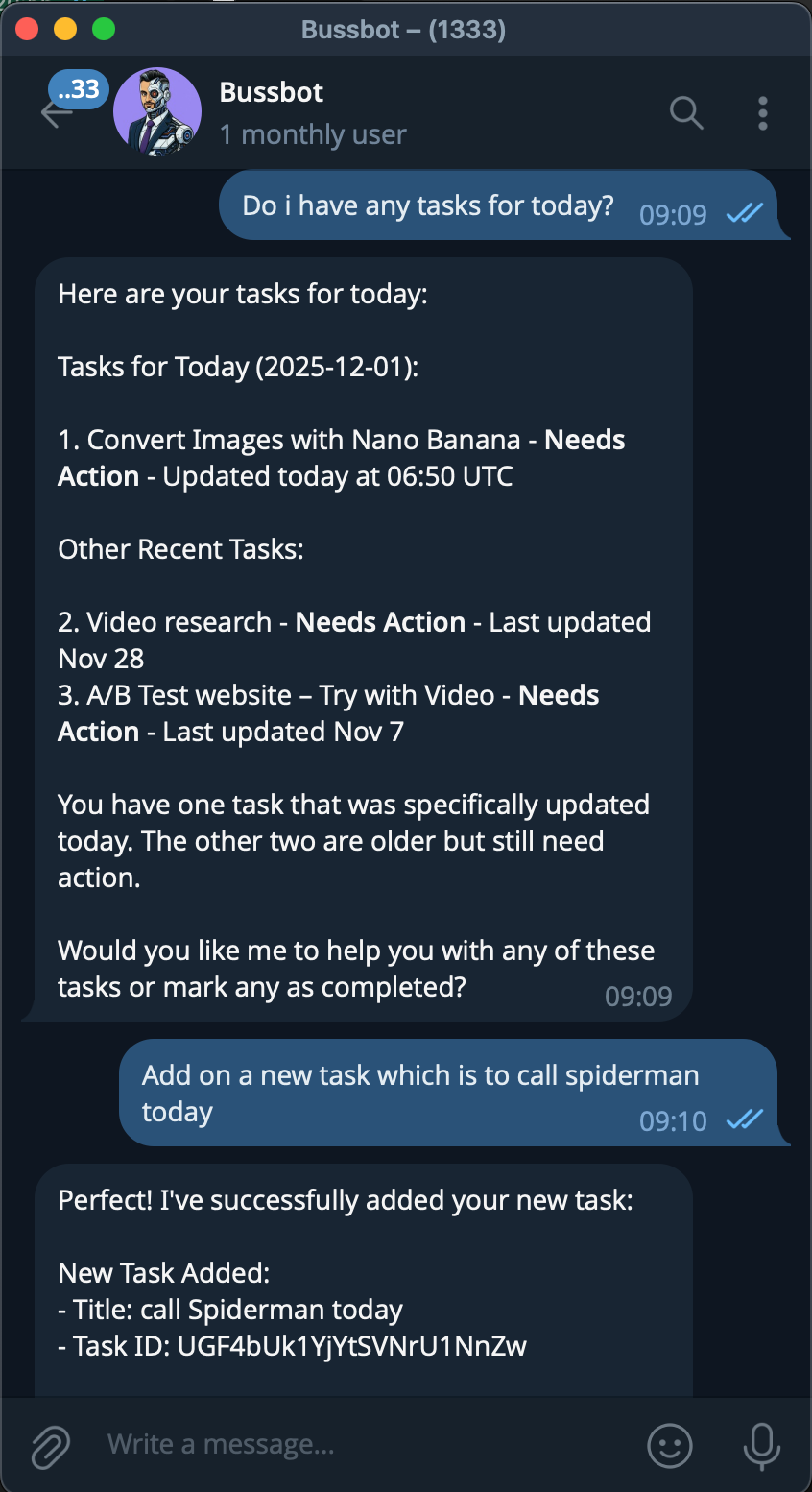
This is the hardest part for most automations.
Creating is easy. Cleaning up is hard.
Humans are vague. We don’t speak in unique IDs. We speak in context.
I wanted to see if the agent could handle a vague deletion request. I didn’t say, “Delete Task ID #44592.”
I said: “Delete that event for Spider-Man.”
Notice the phrasing. “That event.” “Spider-Man.”
I am relying on the AI to understand the history of our conversation.
The agent analyzed the request.
- It looked at the previous context.
- It identified the task related to “Spider-Man.”
- It executed the <em>delete_task</em> function.
I checked my Google Tasks. The Spider-Man task was gone.
This is Level 3 intelligence.
The system is capable of inferring intent. It bridges the gap between how humans speak and how databases work.
You might be thinking,
“Ritesh, I don’t need help remembering to call Spider-Man.”
You are missing the point.
Replace “Google Tasks” with “Salesforce.” Replace “Call Spider-Man” with “Update the Q3 opportunity for Tesla to ‘Closed-Won’.”
The logic is identical.
If you can build this simple workflow in n8n, you can build a system where your sales team updates the CRM via voice notes while driving home.
You can build a system where your project managers delete Jira tickets via Slack.
You are removing the friction of the interface.
The Interface is the Bottleneck.
Every time you have to open an app, navigate a menu, and click a button, you are wasting time. You are stuck at Level 1.
By building these agents, you are creating a “Headless Enterprise.” You interact with the intelligence, not the UI.
This workflow involves setting up Google Cloud Console credentials, configuring the n8n HTTP requests, and tuning the JSON schema for the AI agent.
It was tricky at first to set up the connection parameters. So if you are not tech savvy, I will have the full detailed instructions in our Corporate Automation Library (CAL) which will hosts the n8n code and steps required to get this running on your server.
Click Here to gain access to CAL. We have over 50+ high impact, high ROI automations with 2–4 corporate automations uploaded weekly.
Inside, look for Operations > Ultimate AI Agent. This specific workflow is under #7 Tasks and Reminders Agent.
We have mastered the input (getting tasks) and the internal processing (updating tasks).
But what about the output?
Once you have done the work, you need to tell the world. You need to publish.
In the next part of this series, I am going to show you the Social Upload Agent. We are going to take the content we created and automatically distribute it to your audience.
Stop doing busy work. Start building systems.
Ritesh Kanjee | Automations Architect & Founder
Augmented AI (121K Subscribers | 58K LinkedIn Followers)
From 80-Hour Weeks to 4-Hour Workflows
Get my Corporate Automation Starter Pack and discover how I automated my way from burnout to freedom. Includes the AI maturity audit + ready-to-deploy n8n workflows that save hours every day.
We hate SPAM. We will never sell your information, for any reason.